Statistical Report
To compare or analyse a model after curation, some kind of statistis can be very handy. One idea is to analyse the model with memote, however, the report consists - while being very detailed - purely of numerical values. Additionally, if running it multiple times is required, it can be quite time consuming.
The toolbox refineGEMs provides a quick and graphic alternative in form of the ModelInfoReport class.
It can produce a report on the main (statistic) properties of a model, including:
The basic counts of reactions, metabolites and genes
Counts of the types of metabolites in the model
Number of reactions with and without GPRs
Number and types of unbalanced reactions
Furthermore, these values can be visualised as bar and doughnut chart.
Note
We are currently working on an extension of this class that directly produces a report that compares multiple models instead of just analysing one.
How to create the ModelInfoReport
Via command line
The basic command is:
refinegems analyse stats MODELPATH
Additionally, the path to the output directory can be added using the flag --dir/-d
and the colours of the plot can be changed by passing a valid matplotlib colour palette
abbreviation to --colors/-c.
Inside Python
Assuming a model variable model that contains a cobra.Model entity exists, the
report can be generated as follows:
report = ModelInfoReport(model)

fig = report.visualise() # produces the graphic

# dir : Path to output directory
report.save(dir) # save the report (graphic + table)
Examplary ModelInfoReport visualisation
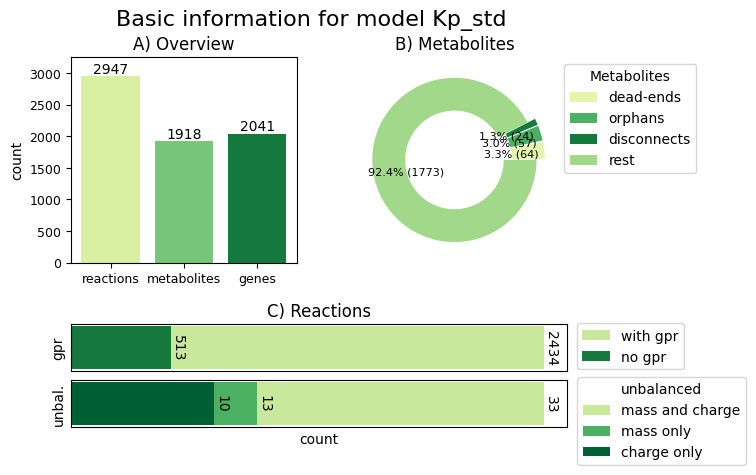
An exemplary visualisation of a report on a Klebsiella pneumoniae model for a strain from a private collection is shown below.
The visualisation contains three subfigures, one for the overview (upper left corner),
one for further statistics about the metabolites (upper right) and one for more information
about the reactions in the model (bottom). The colours are from the default colour palette YlGn.